.png)
In order to facilitate the configuration of the 24Planning Gantt Chart, we ship an example together with the package. This example is explained in the below YouTube video. It is recommended to watch the video first, before getting into the detailed configuration.
Configuring Datasources
Every level in the Gantt chart requires its own data source. As an example, if you are modelling a project with tasks and subtasks, you will need to define 3 datasources for respectively the project, the task and the subtask.
Modelling Hierarchies
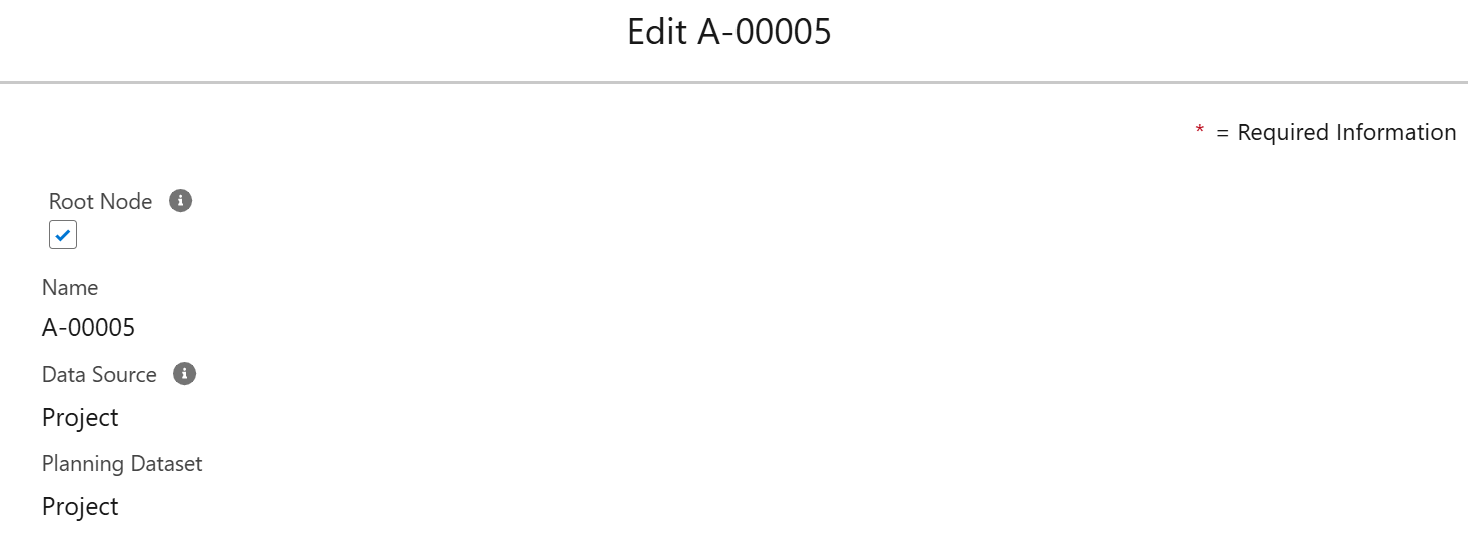
Defining the Root Node
For a particular dataset, there should be one (and only one) datasource that is the top level of the hierarchy. You can configure this top level datasource by checking the box Root Node in the Dataset Datasource object.
Configuring Hierarchies
In addition, you can model the hierarchy between datasources, e.g. between a subtask and a task.
In order to do this, click on New in the Datasource Relation component on the ‘child’ datasource, and configure it as in the example below:
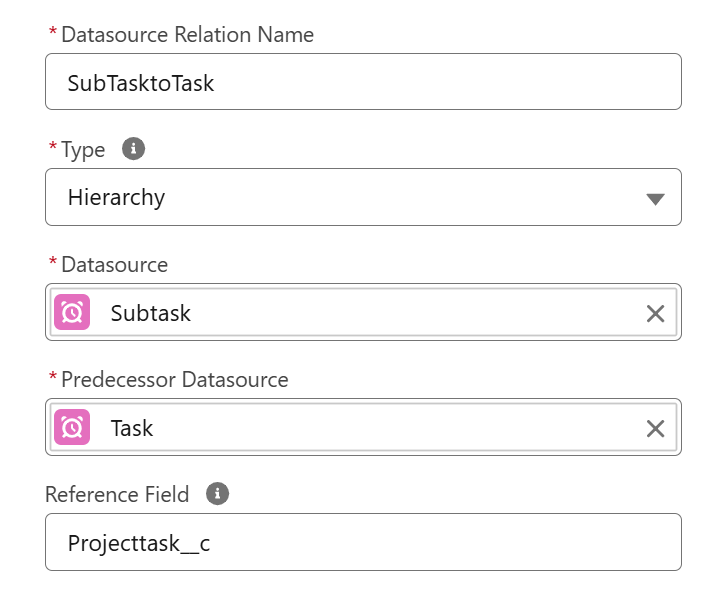
The reference field is the lookup field from the child datasource to the parent datasource.
Modelling Dependencies
Concept
Via the concept of dependencies, you can model dependencies between events, e.g. the most common example is that a task cannot start before one or more predecessor tasks have finished, potentially with some buffer time in between.
This concept of dependencies is modelled via a (custom) junction object. The junction object has the following fields:
-
‘from’ field: which is a lookup to an event.
-
‘to’ field: which is a lookup to an event.
-
lag: which is a number field that expresses the lag in minutes.
-
type: picklist that defines the lag type. You need to apply the following numeric values for the API name of each:
-
End to Start - API name: 2 - the dependent task cannot start before the end date of the preceding task.
-
Start to Start - API name: 0 - the succeeding task cannot start before the start of the preceding task.
-
End to End - API name: 3 - the succeeding task cannot finish before the completion of the preceding task.
-
Start to End - API name: 1 - the successor cannot finish before the predecessor has started.
-
-
is strict dependency: a checkbox that defines whether Gantt should enforce the dependency.
It is also possible to model dependencies via a lookup field, so without using a junction object. In that case the dependency is always End to Start.
Configuring Dependencies
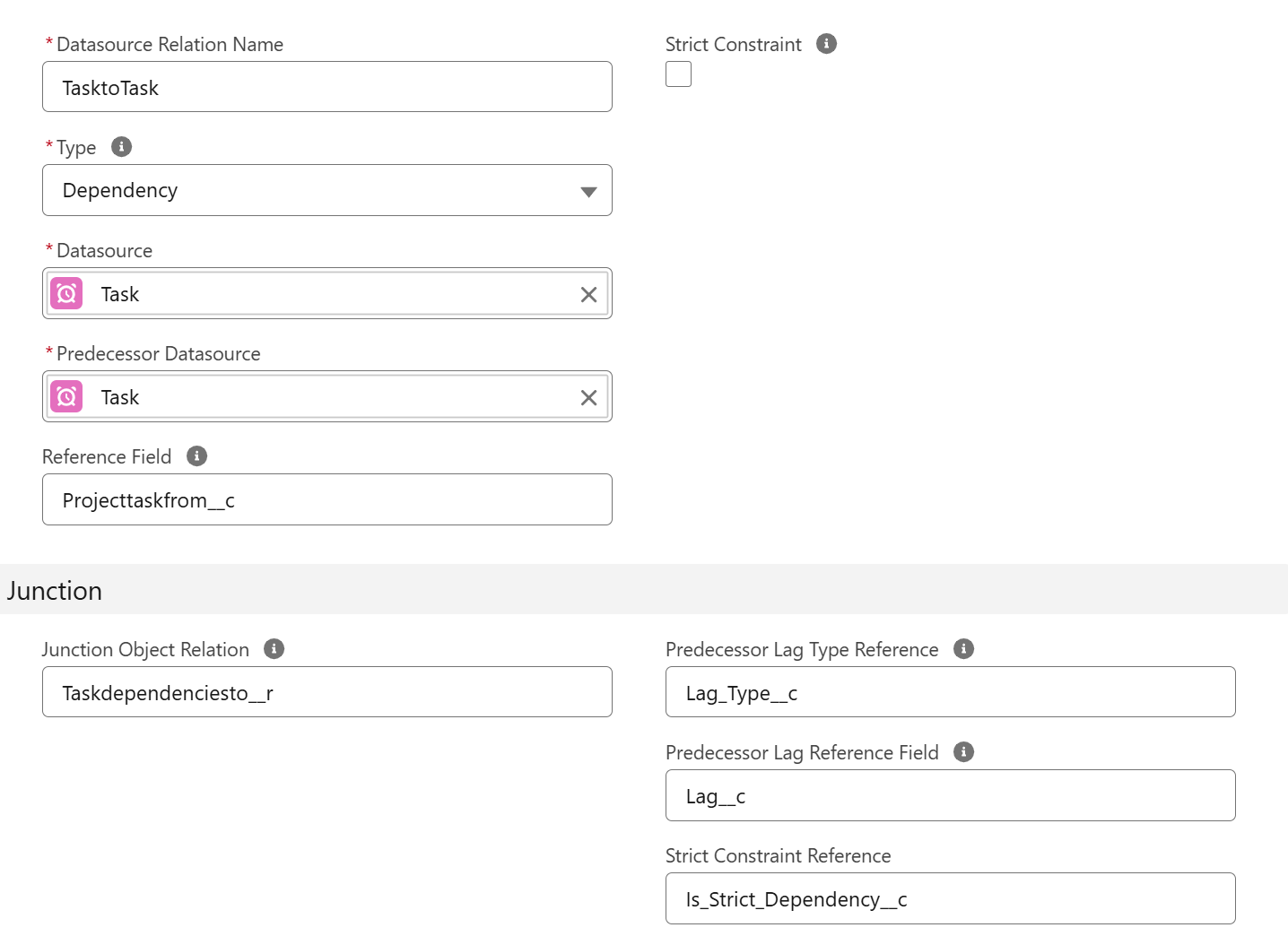
Once you have defined the dependency junction object, you can configure it for a particular datasource as follows:
-
Datasource Relation Name: give a name to the dependency that you are defining.
-
Type: Select Dependency.
-
Datasource: datasource for which we are defining the dependency.
-
Predecessor Datasource: dependent datasource, in many cases this will be the same as the Datasource.
-
Reference field: API name of the lookup field from the junction object to the predecessor object. If you work without a junction object, this is the lookup field from the data event object to the predecessor object.
-
Junction object relation: Name of the Relationship between the dependency and the (successor) event of the datasource. This relationship API name is found on the event object.
-
Predecessor Lag Type Reference: API name of the field on the junction object that defines the lag type.
-
Predecessor Lag Reference Field: API name of the field on the junction object that defines the lag in minutes.
-
Strict Constraint Reference: API name of the checkbox field that defines whether this is a strict constraint.
Below, the example for our dependencies between tasks.