.png)
Planning Board Usability Improvements
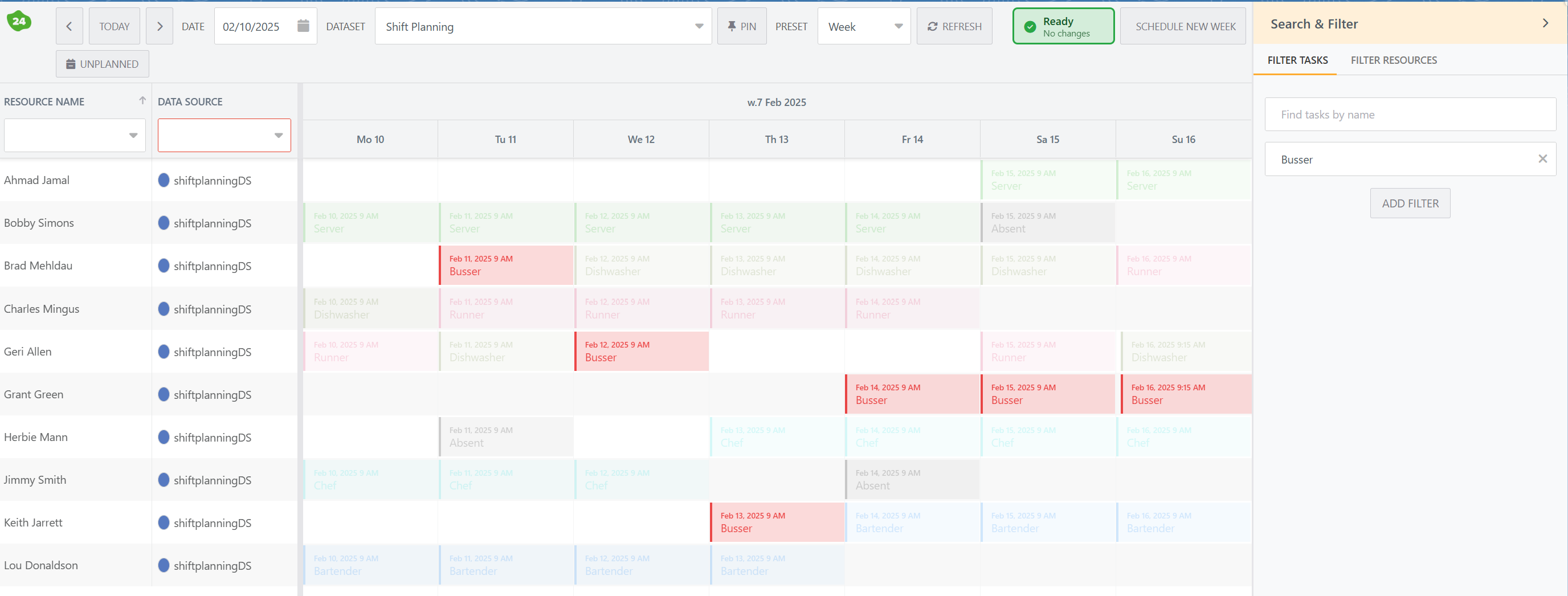
On the righthand side of the planning board, there is a new ‘Search and Filter’ side bar that allows you to search, filter or highlight events and resources. The screenshot below shows the highlight events in action.
In addition, we have added a number of dataset and datasource configuration options to:
-
Change the default row height: In case you have a lot of resources and want a denser layout, you can decrease the row height.
-
Hide the default right-click actions: If your users do not need to edit, view or delete events, you can hide these from the event menu options.
-
New event start and end-date: These start and end-dates are now automatically based on either the workschedule or the Start and End Hour configured in the dataset. The latter in used in case there is no workschedule defined for that specific resource.
Configure which Datasources to Show by Default
A dataset can comprise multiple datasources, and in some cases you may not want to view all of them by default.
In order to provide some flexibility, there is a new checkbox parameter on the Dataset Datasource object, named Default Selected.
The behaviour is as follows:
-
When none of the Dataset Datasource records has the Default Selected box checked, all datasources will be shown by default.
-
When at least one Dataset Datasource records had the Default Selected box checked, only the datasource with the box checked will be shown. Additional datasources can then be selected in the 24Planning board.
If you are upgrading from an older 24Planning release, navigate to Setup>Object Manager and search for Dataset Datasource. Navigate to Page layouts, and add the field Default Selected.
24Planning Performance Improvements
In the summer release, we have implemented many performance improvements, especially w.r.t. the initial loading time of dataset with a large number of resources and events.
To benchmark the improvements, we have compared the performance of the summer release to that of the spring release. We obtained a 10-20% performance improvement in the initial load time of resources and events for use cases with 1,000 to 5,000 events.
These tests were conducted with 10-300 resources and in all test scenarios there were 10 dynamic fields per event.