
24Planning Winter '26 Release
This winter release comes with a brand new GANTT chart module, ideal for companies that manage projects.
In addition to GANTT, we have extended the concept of non-working time. We have introduced two great new concepts:
A new way to define unavailability of individual resources.
The capability to schedule events that partly overlap with non-working time.
Read on to learn more!
24Planning Gantt Chart Module
24Planning now supports a Gantt chart view and the great thing is that it builds on the same concept of datasets and datasource that are used for the resource based view. Hence it provides the same flexibility:
It works with any Salesforce or custom object.
There is flexibility to customize the look and feel via custom fields, colour coding, etc.
You can generate 2 views on the same data: a resource-based view and a Gantt chart view.
The Gantt chart allows you to build:
hierarchies: e.g. a product consists of tasks that in turn consist of subtasks.
dependencies: e.g. a task cannot start before another tasks has finished.
milestones: project milestones have the same start and end date.
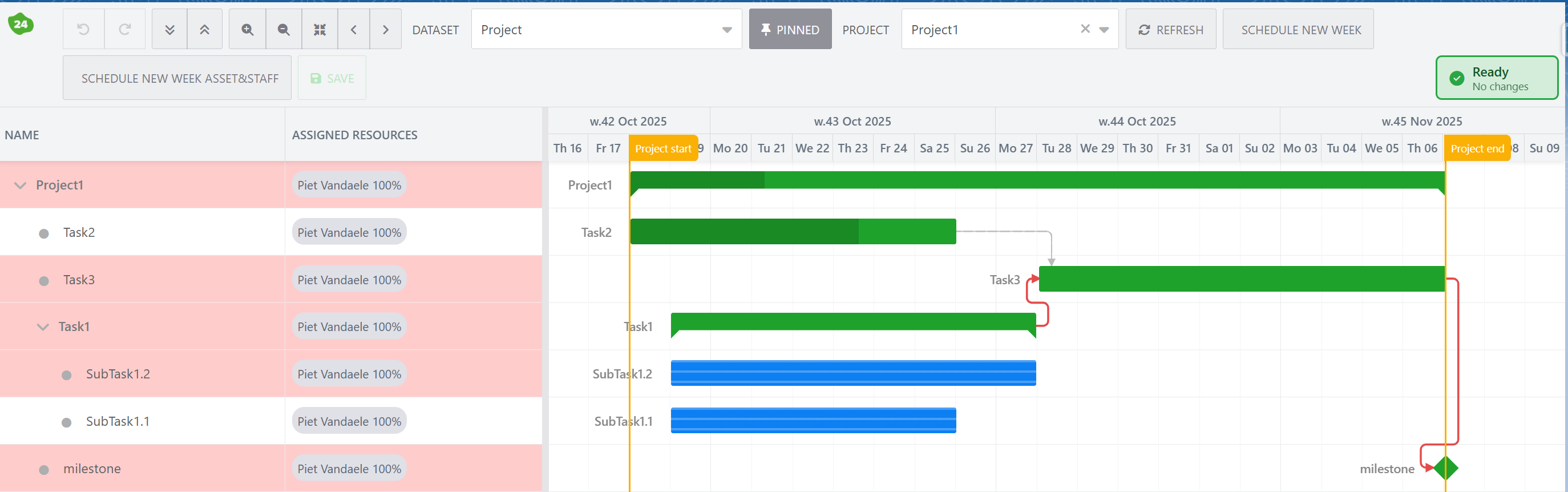
The Gantt Chart allows you to move around events, dependencies are automatically evaluated and events are shift were needed.
The Gantt chart can also highlight the critical path (red line above).
Tasks progress can be monitored, e.g. Task2 above is 70% finished.
Read more on 24Planning’s Gantt chart module here.
Defining Unavailability of Individual Resources
24Planning already supported the concept of Work Schedules and Work Schedule Lines. These are a great way to define working hours and public holidays. The concept also allows for shifts, i.e. each shift has its own work schedule and a field on the resource links to the appropriate shift work schedule.
We have now complemented this with Resource Availability. In the Resource Availability configuration, you define a custom object that holds information on unavailability of individual resources, e.g. absences or holidays of employees or downtime of individual machines.
You can combine Work Schedules and Resource Availability in a single deployment.
Scheduling events that partly overlap with non-working time
Previously, it was not possible to schedule events that partly overlap with non-working time.
Now we have introduced a new scheduling mode called Duration. It changes the behaviour as follows.
Assume you have a 3 hour event that starts at 4pm on Tue. Let’s assume the workday ends at 5pm and commences again on Wednesday at 9am. Then the event will be displayed as starting on 4pm on Tue and ending at 11am on Wednesday, i.e. 24Planning automatically recomputes the event duration such that the work can be spread across multiple days, with non-working time in between.
As a consequence, it is no longer required to split events to fit over multiple days, 24Planning will automatically extend the event total duration, taking into account non-working time.
Read-only Permission Set
We have added a new permission set for 24Planning, specific for read-only users. These users can consult one or multiple dataset in the planning board but are not allowed to update events via 24Planning.